
When people say their internet is slow, the first thing they often do is upgrade their plan. However, before paying more each month, there's one thing to check: where is your router located in your home?
When you visit homes, you start to notice a pattern. Many routers are placed inside the living room TV cabinet, in a corner next to the garage wall, or just left on the floor.
This is usually where the installation technician plugged it in and left it. A convenient spot is not necessarily a good spot.
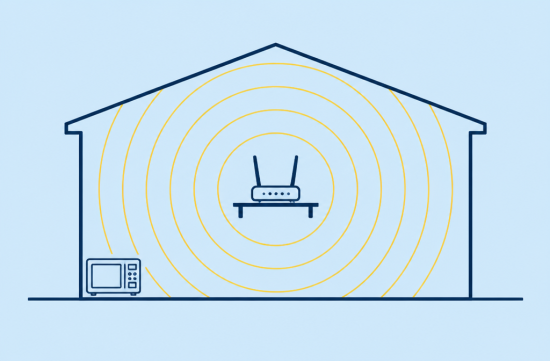
The reason is simple. Wi-Fi is essentially a radio wave, and it spreads out in all directions from the router, including up and down.
If you place it in a corner at one end of the house, a significant portion of the signal leaks out beyond the outer walls to the neighbor's house or yard. Meanwhile, the bedroom on the opposite side often has a weak signal.
The same goes for placing it on the floor. If it's on the floor, the signal that spreads downward simply disappears into the floor and foundation.
That's why most guides say the same thing: place it in the center of the house, at a high location, and in an open area. These three factors are fundamental.
When we say central, we don't mean the geometric center of the floor plan. It means the center of the areas where Wi-Fi is frequently used. If your home office and children's room are far apart, somewhere in between is likely the best spot.
A height of around a shelf or bookcase is sufficient. Different guides suggest slightly different heights, but there is consensus that it should be above waist level and, if possible, close to eye level.
If you have a two-story house, you can also place it near the ceiling of the lower floor or the floor of the upper floor. This way, the signal can cover both floors evenly.
Next, let's talk about obstacles. Many people find this part surprising.
The first is the microwave. Microwaves operate near 2.45GHz, which overlaps with the Wi-Fi 2.4GHz band.
Even though it is shielded, the energy that leaks out while it is operating can disrupt nearby Wi-Fi. If your video calls drop every time you heat up lunch, this could be the culprit.
The second is water. Water absorbs radio waves well. So, if there's a large fish tank between the router and the sofa, the area behind it can easily become a dead zone.
The third is metal and mirrors. Large metal appliances like refrigerators and washing machines can reflect or absorb signals. Large mirrors can bounce signals back due to their metal coating on the back.
The fourth is thick walls. Most American homes are made of wood and drywall, which is somewhat better, but walls made of brick or concrete around a fireplace definitely weaken the signal.
Putting the router inside a TV cabinet can also be more detrimental than you might think. It may look tidy, but it's surrounded by wooden panels, and there's a TV set behind it.
It's also good to know about frequency bands. The 2.4GHz band travels farther and penetrates walls better but is slower and more prone to interference.
The 5GHz band is faster and has less interference but has a shorter range and is weaker against walls. Therefore, it's practical to use 5GHz for devices close to the router and 2.4GHz for devices in distant rooms.
Note that Wi-Fi 6E and 7, which use the 6GHz band, are becoming more common, but they are faster yet weaker against walls. As equipment improves, the placement becomes even more critical.
Nowadays, many routers automatically select the band. However, if you're still experiencing slowness in a specific room, it's worth checking whether it's a placement issue or a band issue.
Checking is not difficult. Install a Wi-Fi analysis app on your phone and walk around each room measuring the signal strength. It's also a good idea to note the speed in each room using a speed test site.
Then, after moving the router, use it for a day or two and measure again in the same way. Compare the numbers, not just your gut feeling. I believe this before-and-after comparison is the most convincing.
Some homes can't move the router due to cables. In that case, consider using a long Ethernet cable to move the router to the center or look into mesh Wi-Fi systems.
If your router has antennas that extend outside, try adjusting their direction. Mixing angles by standing one up and laying one down can sometimes help the signal spread more evenly across floors.
Don't forget about firmware updates. Routers that have been neglected for a long time can be disadvantaged not only in performance but also in security. This can be done in just a few minutes through the management app or settings page.
However, I don't recommend buying mesh equipment right away. Spending money on something that can be solved by just changing the location is inefficient.
Especially during the fall and winter when rainy days are prolonged, people spend more time at home, leading to increased Wi-Fi complaints. Now is a great time to make adjustments.
In summary, move it from the corner to the center, and from the floor to a shelf. Also, keep it away from microwaves, fish tanks, large mirrors, and refrigerators.
My conclusion is clear. It's not too late to decide on a plan upgrade or new equipment after changing the location and confirming with numbers. Take a look at your router's position tonight.
 BeanWave





 Spaghetti Flying Religion |
 Giant Squid and Sweet Potato Soup |
 choi family |
 What can make money? |
 road98 |
 crystalx |
 journey |
 Western US Medical Student Association |
 Seattle - Emerald City |
 mystery |
  Sunny Sunday |
  mini hometown |
  torvia |
  Chichiki Chicago Train |
  Univ Student |
  See It |
  Con Cheese |
  softmoony |
  Breaking Bad Drama |
  New York Queens Native Blog |
  Shinbaram Dr. Blog |
  vivavida |
  Way to easy |
  limestone |
  oster |
  daddyyo |
  neapolis |
  seadoll |
  ansdal |
  Vivid U.S. Regional Information |