
Last week, I turned off all the lights in the living room and sat on the sofa, but I noticed small lights twinkling in the dark. There were the cable box under the TV, the Wi-Fi router, the coffee machine, and the phone charger.
They looked beautiful, like constellations, but I suddenly became curious. Those lights are consuming electricity even at this moment.
So this month, with my electricity bill in front of me, I took a closer look at standby power. To sum it up, it was both less and more than I expected.
Standby power refers to the electricity that continues to flow when devices are turned off but still plugged in. They are waiting for a remote signal, keeping a clock on, or staying awake to receive updates.
According to researcher Alan Meyer from the Lawrence Berkeley National Laboratory, standby power accounts for about 5-10% of total electricity usage in the average American household. However, he noted that there is no unified definition and no large-scale measurement data, so this is just an estimate.
I found some older measurement data as well. When this lab directly surveyed 10 households in Northern California, the average standby power per household was 67 watts, and each household had an average of 19 devices consuming standby power.
67 watts is roughly equivalent to keeping a 60-watt light bulb on all year, which sent a chill down my spine as I read that sentence.
Of course, that data is from around the year 2000. Nowadays, with stricter efficiency standards, the standby power for each device has dropped to below 3 watts, with many products using around 1 watt.
So, unplugging one charger won't change your life. The problem lies with a few larger devices.
Typical examples are the cable box and DVR. The Natural Resources Defense Council (NRDC) pointed out in 2017 that most DVRs today continue to draw 15-20 watts even when not in use.
Now, let's calculate based on our local rates. According to FPL, the bill for a typical household using 1,000 kWh in a month in 2026 is projected to be $136.64.
To simplify the calculations, I combined all the basic fees and estimated the cost at 14 cents per kWh. The exact rate varies slightly depending on usage and taxes, so just get a rough idea.
If you keep 1 watt on all year, that amounts to 8.76 kWh. Multiplying by 14 cents gives about $1.23 per year.
If a charger uses 1 watt, it costs less than half a cup of coffee a year. Honestly, that felt a bit disappointing.
However, if a DVR uses 20 watts, the story changes. That amounts to 175 kWh per year, which translates to about $24.50.
If we apply the old survey figure of 67 watts, that results in 587 kWh per year, costing around $82. While that may seem small compared to summer air conditioning bills in Florida, it's frustrating to pay for something that does nothing.
This is where smart plugs come into play. By cutting off the power to the outlet via an app or timer, you can reduce the standby power of turned-off devices to zero.
But there's a catch. Smart plugs also consume electricity to stay connected to Wi-Fi.
According to user measurements, depending on the model, they consume between 0.6 watts and 1.5 watts when off. Generally, you can consider it around 1 watt.
Still, among the measurements I've seen, there were cases where the plug consumption was nearly 0 when the device was off. Since there is a lot of variation between models, it would be good to check the standby consumption figures in reviews before choosing one.
So, if you plug a 1-watt charger into a smart plug, you won't save much. In fact, the plug might consume more.
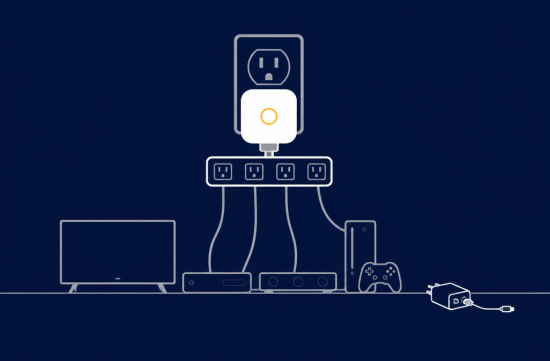
On the other hand, if you connect a TV, soundbar, gaming console, and cable box to a single power strip and cut that power strip with a smart plug, the savings can be significant. You're putting multiple devices to sleep with the standby power of just one plug.
However, there are some devices you shouldn't unplug. Leave the DVR with scheduled recordings, the Wi-Fi router, and the refrigerator on.
Completely cutting power to the cable box can lead to longer boot times and missed updates overnight. It's less of a hassle to use it only when traveling or in rooms that are rarely used.
For now, I've installed smart plugs on one power strip for the living room TV and one for the guest room. I set them to turn off at midnight and turn back on at 7 AM, and I haven't experienced any inconvenience.
I'll have to wait until next month's bill to see exactly how much I've saved. The FPL app allows you to view usage by time of day, so it would be interesting to check how much the baseline usage drops during the early morning hours.
In fact, what was even better than saving a few dozen dollars was that the living room became truly dark at night. With the twinkling little lights gone, the moonlight outside was much more visible.
If it were me, instead of going around unplugging each charger, I would choose one or two spots where devices are clustered and install smart plugs there. Starting small and confirming savings through the bill seems the most reliable approach.
 PizzaDrone






 holy cow |
 Soy Angelino |
 SKy Face |
 gleeful |
 forevergee |
 Way to easy |

 seouljung |

 Florida Gario |
  vivavida |
  limestone |
  oster |
  daddyyo |
  neapolis |
  seadoll |
  ansdal |
  Vivid U.S. Regional Information |
  Vasila's Newlywed Blog |
  Arizona Cowboy |
  merry merry |
  Hoorah Ooorah |
  Fragile Me |
  Rowland Mama |
  foxtree |
  bayaa |
  loveyom |
  Coastal city |
  Spaghetti Flying Religion |