
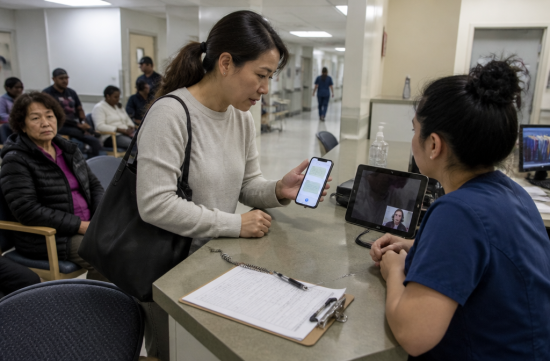
Last month, I went to the emergency room with a friend and it was quite stressful. The doctor asked, "Any history of allergic reaction?" and my friend just looked at me.
I wasn't confident with medical terminology, so I took out my phone. I learned a lot that day, so I organized how to use interpretation apps in hospitals and government offices.
First, there's something important to note. The first thing to use is the hospital's free interpretation service.
According to federal law ACA Section 1557, institutions like hospitals, clinics, and insurance companies must provide meaningful language access to patients who are not proficient in English. The revised regulations for 2024 state that this service must be free, accurate, and timely.
The same regulation also states that patients should not be asked to bring their own interpreters or pay for the service. So, all you need to say is, "Korean interpreter, please."
California has its own state law. Under Health and Safety Code Section 1259, general hospitals must establish language support policies and review them annually.
State government agencies are subject to the Dymally-Alatorre Bilingual Services Act. If more than 5 percent of users are not proficient in English, they must have enough bilingual staff and translate key documents.
In March 2025, an executive order designating English as the official language was issued, which rescinded the existing LEP guidelines from the Department of Justice. However, this executive order does not eliminate the law, so Section 1557 and Title VI of the Civil Rights Act remain in effect.
Honestly, I have a different perspective on this. I believe it's better to prepare for my own needs rather than waiting for the government to take care of everything.
So, I think it's most practical to use the app for waiting rooms, reception desks, and simple questions, while calling for professional interpretation for diagnosis explanations or consent forms.
Interestingly, federal regulations do not completely prohibit machine translation. However, it states that content affecting rights or benefits, content requiring accuracy, and content with many technical terms should be reviewed by qualified individuals.
If institutions are cautious about this, it's unreasonable for individuals to rely solely on an app for surgical consent forms. I personally would never trust just an app to sign such documents.
So, what apps should you download? If you have an iPhone, the basic translation app's conversation mode is quite useful.
By pressing the microphone button and speaking, it detects the language automatically, and if you switch to a face-to-face display, the other person can read their text directly.
There's also real-time translation with AirPods. Since iOS 26.1, Korean has been added as a supported language, but you need an iPhone with Apple Intelligence.
Both Android and iPhone users can use Google Translate's conversation feature, and Galaxy phones have a separate interpretation mode. Naver Papago also has a conversation feature that tends to produce more natural Korean honorifics.
Here's a tip: Download the Korean language pack for offline use in advance.
Inside hospitals or waiting rooms in government offices, there are often weak signals. I remember struggling to get Wi-Fi in the emergency room that day.
There are also some tips for usage. Keep sentences short and speak one at a time.
Instead of saying, "I have had a stomach ache and a fever since yesterday," break it down to "I have a stomach ache," "since yesterday," and "I also have a fever" to reduce misinterpretations.
It's good to have the names of medications, allergies, and any current medications written down in English beforehand. If the app misinterprets something, showing the notes will help.
When showing the translated sentence to the other person, check by asking, "Does this make sense?" You can gauge whether it was communicated correctly just by looking at their expression.
Avoid assigning interpretation duties to children. Federal regulations state that hospitals cannot use minor children as interpreters unless it's an emergency.
For children, conveying a parent's medical condition instead of an adult is a significant burden. I believe this is a matter of common sense, beyond just the law.
The same goes for documents. If you ask whether there are translated guides or application forms in Korean, you might be surprised to find them in a drawer.
Using the app's camera translation to scan documents is also an option. However, for tables or small text, the lines often get mixed up, so use it only for understanding the content.
When receiving a number at a government office, first ask if they have Korean interpretation available. Surprisingly, many places will connect you to a phone interpreter.
That day in the emergency room, the nurse eventually connected me with a Korean video interpreter via a tablet. I wish I had asked sooner.
In summary, it goes like this: for major decisions, use professional interpretation; for everyday conversations, use the app; and for preparation, I should do it in advance.
Do not rely solely on app translations for health-related decisions; always consult directly with a doctor or pharmacist. I recommend opening your phone tonight and downloading the Korean language pack first.
 SkyStudio








 Khan Film Blog Production |
 dermoon |
 hoosierdaddy |
 sun walker |
 Let's Be Like a Salt-like City Person |
 Korean Blog |
 Coastal city |
 Sammy Beach |
 Key spots |
 Fong Mr |
  constant |
  Leapfrog Move |
  vibranto |
  Tora Tora |
  yellowbutter |
  Dolly |
  US Embassy |
  NYC saladbar |
  Finding Superfoods |
  lightyear |
  song bang |
  vexomo |
  Indiana Jones |
  meloncat |
  novapixel |
  mortrix |
  Esther 1983 |
  fortbliss |
  Moscow Kim |
  My Two Way |