
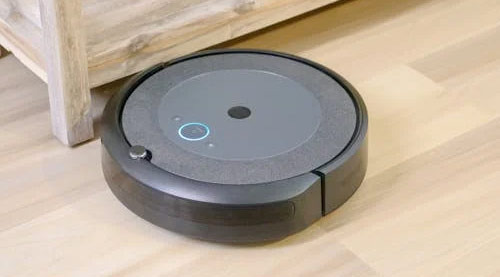
The Roomba robot vacuum is quite durable, but some parts need to be regularly checked and replaced depending on continuous use.
Below is information on Roomba's durability and key replacement parts.
Durability of Roomba
- Average Lifespan: Generally, a Roomba can be used for about 5 to 7 years. With regular maintenance and depending on the environment, the lifespan can be extended.
- Durability Components:
- Motor and Battery: Designed using high-quality parts, but the battery is a consumable that needs periodic replacement.
- Sensors and Brush System: Performance may degrade due to dust and debris, so regular cleaning and inspection are necessary.
Main Parts That Need Replacement
Battery
- Replacement Cycle: 1.5 to 3 years (varies based on usage frequency and charging cycles).
- Symptoms: Replacement is needed if the battery life significantly shortens or if it does not charge properly.
Filter
- Replacement Cycle: 2 to 3 months (varies based on usage environment).
- Function: Filters dust and allergens.
- Symptoms: Replace if suction power weakens or if excessive dust accumulates on the filter.
Brushes (Main Brush and Side Brush)
- Replacement Cycle: 6 to 12 months (wear rate varies based on hair or debris).
- Function: Pushes dust and debris from the floor to the suction inlet.
- Symptoms: Replace if brushes are worn or tangled and do not operate properly.
Dust Bin and Dust Bag (for some models)
- Replacement Cycle: Dust bags should be replaced when full, and the dust bin should be replaced if damaged.
- Function: Collects dust generated during cleaning.
- Symptoms: If the dust bin does not close properly or is broken.
Wheels
- Replacement Cycle: Varies based on the wear condition of the wheels.
- Function: Ensures smooth movement of the Roomba.
- Symptoms: Replace if noise occurs during movement or if it cannot overcome obstacles.
Sensors
- Replacement Cycle: When malfunctions occur or if operation is incomplete due to dust.
- Function: Detects obstacles and sets paths.
- Symptoms: If it keeps bumping into walls or furniture or cleans inefficiently, inspection and cleaning are needed.
Maintenance Tips
- Regular Cleaning:
- Periodically clean brushes, filters, and dust bins to maintain performance.
- Check for Updates:
- Update to the latest firmware to maintain optimal cleaning performance.
- Proper Storage:
- Do not store the Roomba in places with high humidity or temperature fluctuations.
- Parts Purchase:
- Use genuine parts to prevent performance degradation and compatibility issues.
Where to Buy Parts
- Official Website: Genuine parts can be purchased at iRobot.com.
- Online Retailers: Compatible parts can be purchased from Amazon, Best Buy, etc.
- Local Retailers: Parts can be purchased at Walmart, Target, etc.
By ensuring proper maintenance and part replacement, you can optimize the performance and extend the lifespan of your Roomba.
As of now, there have been no official reports of battery explosion incidents involving the Roomba robot vacuum.
However, all electronic devices using lithium-ion batteries carry potential risks, so it is important to follow the guidelines below for safe use.
Safe Use Guidelines:
Use Genuine Batteries: Use genuine batteries provided by the manufacturer to avoid risks from compatibility issues.
Use Genuine Chargers: Use chargers provided by the manufacturer to prevent risks from overcharging or voltage mismatches.
Avoid Overcharging: Do not leave the Roomba connected to the charger for long periods, and disconnect it once charging is complete.
Avoid High-Temperature Environments: Do not use or store in direct sunlight or high-temperature areas.
Regular Inspections: Periodically check for signs of swelling, discoloration, or leakage in the battery, and if any issues are found, stop using it immediately and contact the manufacturer.
By following these guidelines, you can prevent battery-related incidents and use your Roomba safely.





 Alpha and Omega World |

 Yellow Snowman |
 draxen |
 SODA MAKER |
  Tonky |
  viroma |
  cookie |
  Live and that's it |
  Alright Twain |
  eatontown blog |
  HAWAII Korean Church News |
  Amore |
  linex |
  Balancework |
  laro90 |
  MEDBIO American Doctor Blog |
  SWAT TEAM BLK |
  DREAM BIG |
  frostbite |
  330 Forever My Love |
  El Dorado |
  dralix58 |
  Gorama Round |
  Skydiving |