

Living in New York, you often find essentials like lip balm, wallet, iPhone, Bluetooth earbuds, and of course, a charging cable in your handbag.
In the past, it was all about the Lightning cable for iPhones, but nowadays, the world is shifting to USB-C.
With laptops, tablets, and even power banks all using USB-C, life seems a lot easier.
However, when having a beer with friends, the topic of USB-C often comes up.
"Hey, isn't it supposed to be the same on both sides? But why does it feel like it works better when I flip it around?"
I've experienced that too. Sometimes when I first plug it in, nothing happens, but when I flip it and plug it back in, it finally makes that ding sound and starts charging. Then I think to myself, "Ah, so this side must be the better side for connection."
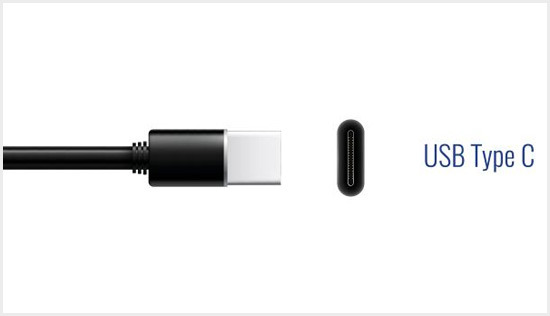
To set the record straight, USB-C is designed so that there is no performance difference regardless of how you plug it in.
The internal pin arrangement is symmetrical, so charging or data transfer speeds should be the same no matter which way you connect it.
So why do we feel the need to flip it to make it work better?
It's all due to our impatience. There's a good chance that tiny dust particles are stuck in the port, or the cable isn't fully inserted, causing a slight misalignment. When we try to reconnect it, we unconsciously apply more force or adjust the angle. Only then does it finally connect 'properly,' but our brains mistakenly think, "It must have been the direction that was the issue!"
This phenomenon peaks when you're on the crowded 7 train during rush hour, hurriedly trying to connect a power bank.
When you plug it in while the train is shaking, it often only partially connects.
When it doesn't charge and you flip it around, you finally push it in all the way, leading you to blame the direction.
Moreover, Apple has recently faced pressure from the European Union (EU) and has transitioned from its proprietary Lightning connector to USB-C.
While things have definitely improved compared to the stubborn days, this thin cable now has to handle not just charging but also ultra-fast data transfer, making it more sensitive to connection issues. Some cables can send power but not data, adding to the confusion.
While USB-C has certainly made life easier, it's not without its flaws.
Still, it's a hundred times better than the old days of struggling to align the cable in a dark room.
These days, when charging doesn't work, instead of immediately doubting the direction, I take a breath and make sure to push it in all the way.
In the hustle and bustle of city life, being hasty with a USB-C connection only leads to more frustration for me.






 Korean Mom |
 novapixel |
 Peter Pan Pet |
 horse |
 Sunset Oregon |
 Tomato Health Club blog |
 Open Flex Mind |


 Moo Tang Clan |
  DREAM BIG |
  frostbite |
  330 Forever My Love |
  El Dorado |
  dralix58 |
  Gorama Round |
  Skydiving |
  dreamport |
  Yellow Snowman |
  Toaster Pizza Magic Show |
  velvetnom |
  Anytime Journey |
  Mrs. Duluth |
  jaxter |
  Atlanta Mama |
  Baguette Blog |
  Tan Sol |
  US Embassy |
  My NYC |