


In 2025, I would like to discuss a more sophisticated attack technique that differs from the traditional methods of malware infection, alongside the advancements in AI.
As you may know, in the past, malware infections often occurred when downloading videos or files. However, these days, there are increasing cases where simply visiting a website can lead to malware being installed by exploiting browser security vulnerabilities.
Recently, there have been many reports of malware being spread on major hacked sites—ranging from securities firms and file-sharing sites to newspapers, alumni associations, and university sites. In this way, hackers maintain basic techniques while developing more sophisticated infection methods. A representative example is the phishing scam technique known as 'pharming.' Pharming is an attack method that allows malware to be installed just by visiting a site, without the user needing to download videos or files.
To explain in more detail, when a user proceeds with online shopping or card payments as usual, they are led to input important financial information such as card numbers and expiration dates in a newly appeared fake authentication window during the existing authentication process. This authentication window is designed to look almost identical to the screen seen during the actual payment process, making it characteristic that users input their information without any suspicion.
The frightening aspect is that this malware can change itself according to the hacker's commands based on the situation. In fact, once malware is installed, all necessary information for payment, such as certificate passwords, passwords, card numbers, and the CVC number on the back of the card, is collected in sequence. Afterward, the malware disappears from the computer on its own, so victims often only realize that their financial information has been stolen when they see a statement showing money has been withdrawn without feeling any abnormalities.
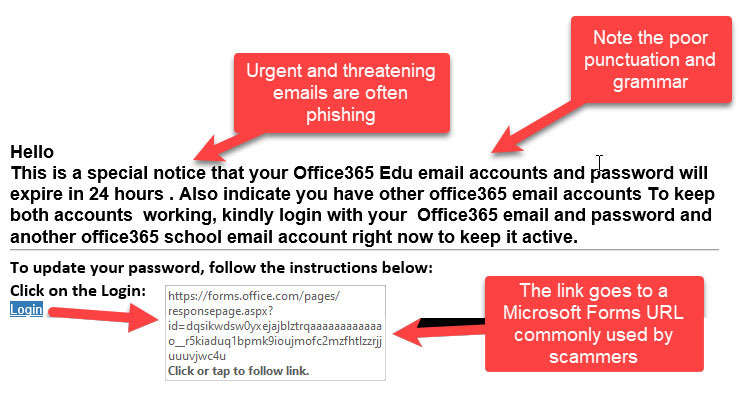
Please refer to the tips below to protect your personal information.
First, it is important to always keep your operating system and all software up to date. Installing security updates and patches can help address known vulnerabilities, making it harder for malware to infiltrate. Since older operating systems have known weak points, you should develop a habit of regularly checking for and installing updates.
Second, you should install a reliable security program and keep it up to date. Using antivirus and anti-malware software can help detect and block threats in real-time. Additionally, blocking unnecessary access from outside through firewall settings is also an effective method.
Third, you should carefully examine suspicious links or attachments. Always verify the source of files or URLs sent via email or messenger. Clicking on unknown sites or suspicious links is a major cause of malware infections, so it is advisable to develop a habit of hovering over links with your mouse to identify them in advance.
Fourth, it is advisable to manage your internet browser and related add-ons (plug-ins) to the latest version and delete unnecessary extensions. There have been frequent reports of malware distribution cases exploiting browser vulnerabilities, so it is safer to deactivate or remove unused features.
Finally, it is recommended to perform backups regularly. No matter how thorough your security measures are, it is important to prepare for unexpected situations. By backing up important files and data to external storage devices or cloud services, you can quickly recover in case of incidents like malware infections.
Mobile phones, like computers, have operating systems and various apps, so if there are security vulnerabilities, there is a risk of exposure to malware. Especially in the case of smartphones, if security weaknesses are found during app downloads or browser access, hackers may exploit them.
For example, if you are using an outdated operating system or app that has not been properly updated, malware can infect you when accessing a hidden website. Additionally, clicking on suspicious links or ads may automatically install malicious apps on your phone, so caution is needed. Therefore, it is important to regularly check for updates to the operating system and apps while using your phone and to avoid apps or links from untrusted sources.
Always be vigilant and protect your personal information safely.







 Korean Mom |
 novapixel |
 Peter Pan Pet |
 horse |
 Sunset Oregon |
 Cherokee Rose |
 Dingho and USA News |
 Korea Tiger News |
 moonshine 7 |
 laro90 |
  MEDBIO American Doctor Blog |
  SWAT TEAM BLK |
  DREAM BIG |
  frostbite |
  330 Forever My Love |
  El Dorado |
  dralix58 |
  Gorama Round |
  Skydiving |
  dreamport |
  Yellow Snowman |
  Toaster Pizza Magic Show |
  velvetnom |
  Anytime Journey |
  Mrs. Duluth |
  jaxter |
  Atlanta Mama |
  Baguette Blog |
  Tan Sol |